
Account
Plans and billing
How the free trial, plans, usage limits and subscriptions work, how to change or cancel a plan, and what stops if an account has no active plan.
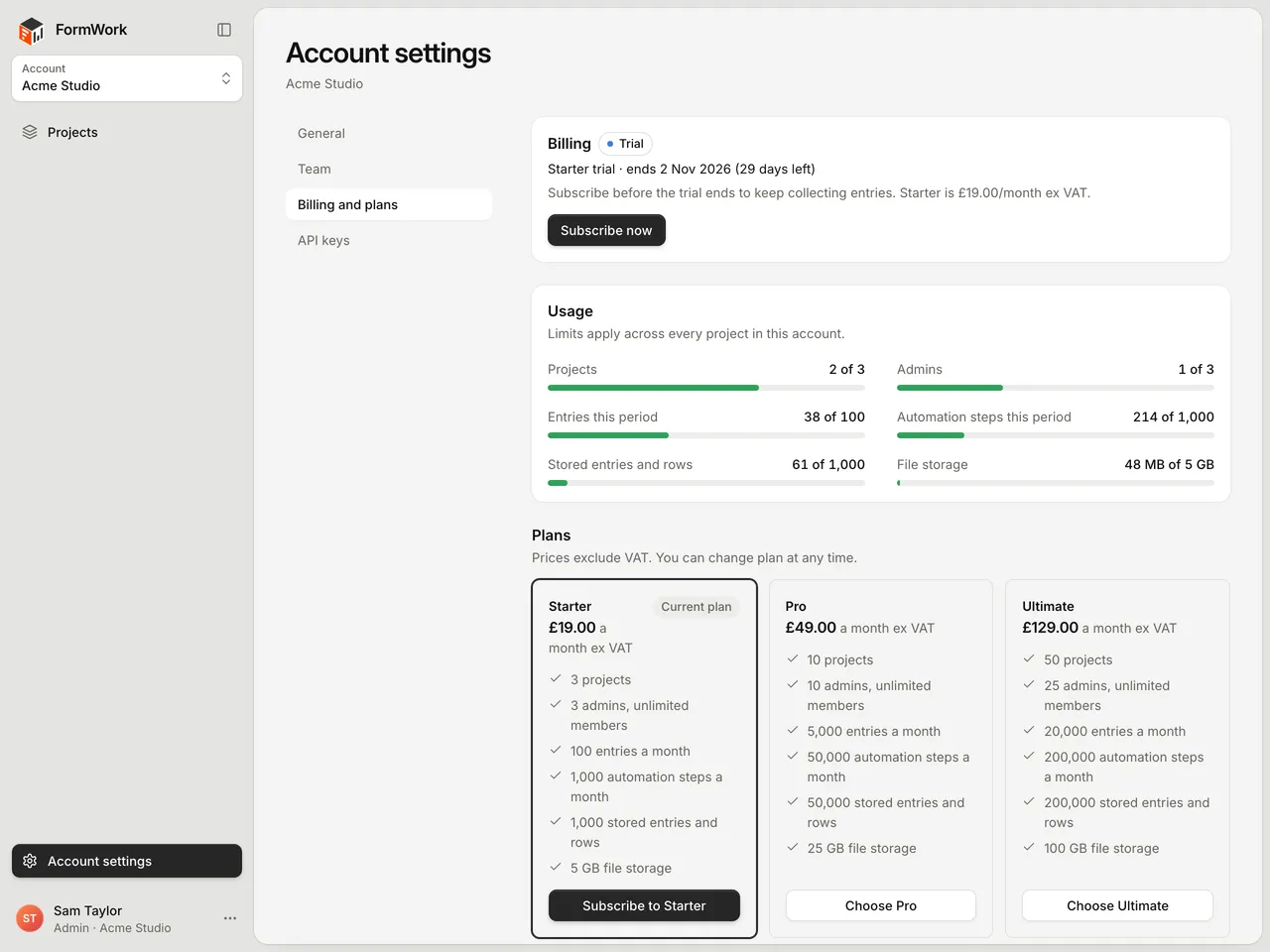
Billing applies to the whole account: one plan covers every project in it. Go to Account settings > Billing and plans to see your plan, your usage and the options to subscribe. Everyone in the account can see this page. Only admins can subscribe or change the plan.
Free trial
Every new account starts a 30-day free trial of the Starter plan. You don’t need a card to start.
- Billing and plans shows the trial end date and how many days are left.
- In the last 7 days, admins see a reminder in the sidebar.
- To keep collecting entries after the trial, subscribe before it ends. Any trial days left carry over into your subscription, so you aren’t charged until the trial would have ended.
Each account you create has its own trial.
Plans
| Starter | Pro | Ultimate | |
|---|---|---|---|
| Price a month, excluding VAT | £19 | £49 | £129 |
| Projects | 3 | 10 | 50 |
| Admins | 3 | 10 | 25 |
| Entries a month | 100 | 5,000 | 20,000 |
| Automation steps a month | 1,000 | 50,000 | 200,000 |
| Stored entries and rows | 1,000 | 50,000 | 200,000 |
| File storage | 5 GB | 25 GB | 100 GB |
Every plan includes unlimited members and unlimited forms. Only admins count towards the admin limit.
Usage
The Usage card shows how much of each limit the account has used. A meter turns amber at 80% and red at the limit.
| Meter | What it counts |
|---|---|
| Projects | Projects in the account. |
| Admins | People with the Admin role. Members aren’t counted. |
| Entries this period | Entries submitted in the current billing period, across every form. Data table rows and team fields aren’t counted. |
| Automation steps this period | Every step an automation runs in the current billing period. |
| Stored entries and rows | Form entries and data table rows that haven’t been deleted. |
| File storage | The size of uploaded and generated files that haven’t been deleted. |
The period is your subscription’s billing period, or the trial while you are on a trial. Deleting entries, rows or files lowers the stored counts. The period counts only go down when a new period starts.
Going over a limit
FormWork doesn’t stop you working when you go over a plan limit. The meter shows you are over, and you can move to a bigger plan.
On Ultimate, an Ultimate overage estimates card shows what usage beyond the plan’s allowance would cost at these rates. The estimates are for information only. FormWork doesn’t charge them automatically.
| Over the limit on | Rate |
|---|---|
| Entries | £5 for each extra 1,000 |
| Automation steps | £5 for each extra 50,000 |
| Stored entries and rows | £5 for each extra 10,000 |
| File storage | £1 for each extra GB |
| Projects | £1 for each extra project |
| Admins | £5 for each extra admin |
Subscribe
Only admins can do this. Members see “Only admins can change the plan.” instead of the buttons.
- Go to Account settings > Billing and plans.
- Choose a plan:
- During a trial, select Subscribe now to keep the Starter plan, or select Choose Pro or Choose Ultimate under Plans.
- After the trial has ended, use the plan cards under Plans: Subscribe to your current plan, or Choose another one.
- Complete the payment in Stripe Checkout.
You return to FormWork when you have finished. It can take a minute for the new plan to show.
Change or cancel your plan
Once you have a subscription, select Manage billing to open the Stripe billing portal, where you can change or cancel your plan. If you cancel, Billing and plans shows the date your plan ends.
An account that has had a subscription keeps Manage billing after it is cancelled, instead of the plan buttons. Use the billing portal to start it again.
Billing status
| Status | Meaning |
|---|---|
| Trial | The free trial is running. Everything works. |
| Active | You have a paid subscription. Everything works. |
| Inactive | The trial has ended or the subscription has stopped. |
When billing is inactive
Your forms, entries and settings stay, and your team can still sign in and work with existing entries. These things stop until an admin subscribes:
- Respondents submitting forms
- Uploading files, in forms and in FormWork
- Creating projects
- Inviting an admin or making someone an admin
API requests for these return 402 with the error code billing_inactive.
Troubleshooting
| Problem | What to do |
|---|---|
| You see “Only admins can change the plan.” | Only admins can subscribe or change the plan. Ask an admin. |
| You can’t see Subscribe now | It only shows during the trial. After the trial, use the plan cards under Plans. If the account has had a subscription, use Manage billing. |
| The new plan isn’t showing after payment | Wait a minute and reload the page. |
| Respondents can’t submit the form | Check Billing and plans. If the status is Inactive, an admin needs to subscribe. |